
Direct Answer: MOVA P10 Pro Ultra Gen 2 robot vacuum and mop review results show a powerful, mopping-focused robot with 26,000Pa suction, rotating mop pads, hot-water washing, and an automated dock. Its biggest weaknesses are obstacle avoidance, hair handling, and battery efficiency, making it best for hard-floor homes.
The MOVA P10 Pro Ultra Gen 2 is an ambitious robot vacuum and mop that focuses heavily on automated floor care. It combines high claimed suction, dual rotating mop pads, LiDAR navigation, carpet detection, automatic dust emptying, mop washing, mop drying, and detergent management in one system.
The headline specification is its 26,000Pa maximum suction, which is double the advertised suction rating of the original P10 Pro Ultra. MOVA also adds 12N downward mop pressure, 260 RPM mop rotation, 212°F hot-water mop washing, and an upgraded self-cleaning dock.
However, a good robotic vacuum cannot be judged by suction numbers alone. Independent testing found that the Gen 2 improved substantially in mopping and carpet deep cleaning but lost ground in obstacle avoidance, hair handling, navigation efficiency, and battery efficiency compared with the first-generation P10 Pro Ultra.
Bottom Line: The P10 Pro Ultra Gen 2 is best viewed as a mopping-first robot vacuum system, rather than a universally superior replacement for its predecessor.
MOVA P10 Pro Ultra Gen 2 Quick Verdict
The P10 Pro Ultra Gen 2 sits in the increasingly competitive premium/mid-range robot vacuum category. Its goal is straightforward: automate as much floor cleaning as possible while reducing the amount of daily maintenance required from the owner.
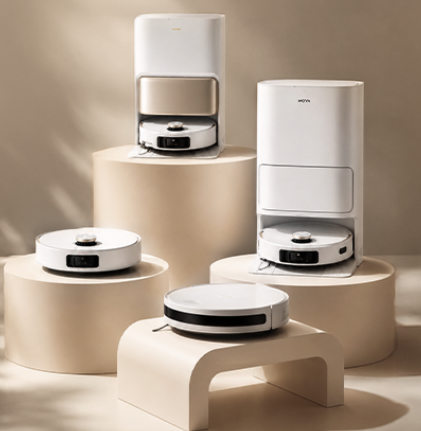
The robot vacuums, mops, returns to its dock, empties collected debris, washes its mop pads, dries them with heated air, and manages clean and dirty water through the all-in-one station. MOVA also includes room-based cleaning controls and multi-level mapping.
The biggest attraction is the combination of 26,000Pa suction, TurboPress mopping with 12N downward pressure, and mop rotation of up to 260 RPM. Those numbers sound impressive, but the important question is how they translate into actual floor cleaning.
What Is the MOVA P10 Pro Ultra Gen 2?
This is a fully autonomous cleaner designed to handle both dry debris and wet floor cleaning.
Its top-mounted LiDAR system creates maps of the home and helps the robot plan cleaning routes. The system supports multi-floor mapping, virtual barriers, room selection, and no-go/no-mop zones.
For homes with mostly hard flooring, the mopping system is particularly interesting. The rotating pads apply physical pressure rather than simply dragging a damp cloth across the floor.
The dock then washes the pads using 212°F/100°C hot water and can dry them using heated air. MOVA states that the pads can be dried in approximately one hour under its Eco-Dry system.
The Biggest Strengths
The strongest part of the Gen 2 is undoubtedly its mopping system.
The combination of 12N downward pressure and 260 RPM mop rotation gives the pads substantially more mechanical action than a basic passive mop. That matters when dealing with dried food, kitchen residue, footprints, and other sticky messes.
The automated dock is another major advantage. Instead of manually removing wet mop pads after every cleaning cycle, the system handles washing and drying automatically.
Vacuuming is also respectable. Independent testing reported strong debris pickup and an 89% carpet deep-clean score, higher than the original P10 Pro Ultra’s 81% result in the same test.
The extending side brush and edge-focused cleaning hardware also help the robot reach areas that conventional circular cleaning patterns can leave behind.
Bottom Line: The Gen 2’s strongest argument is not simply its suction rating. It is the combination of strong vacuuming, aggressive rotary mopping, and hands-off dock automation.
The Biggest Weaknesses
The largest concern is obstacle avoidance.
The original P10 Pro Ultra used an RGB camera and 3D structured-light system capable of recognizing numerous obstacle types. Gen 2 instead uses a simpler front laser arrangement, and independent testing found a major decline in obstacle avoidance.
This means owners should be more careful about leaving cables, socks, toys, and other small objects on the floor.
Hair handling is another weakness. Although MOVA markets the Gen 2 as pet-hair friendly and includes anti-tangle technology, independent testing found weak pet-hair results and significant hair tangling with the standard brush.
Battery efficiency also did not improve in proportion to the larger advertised runtime.
Who Should Buy It?
The Gen 2 makes the most sense for homeowners who prioritize mopping and automated maintenance.
It is particularly attractive for hard-floor homes, kitchens, households with frequent food spills, and people who want the robot to perform more dock maintenance automatically.
It is less attractive for homes with lots of floor clutter, cables, toys, or heavy-shedding pets.
Bottom Line: Buy the Gen 2 primarily for mopping performance and dock automation. If obstacle avoidance and pet-hair handling are your top priorities, other options deserve consideration.
MOVA P10 Pro Ultra Gen 2 Specifications and What’s New
Understanding the specifications is important, but each number needs context. Robot-vacuum specifications can describe maximum capability without necessarily predicting real-world cleaning results.
Here are the manufacturer’s core specifications:
| Specification | MOVA P10 Pro Ultra Gen 2 |
|---|---|
| Maximum suction | 26,000Pa |
| Battery | 5,200mAh |
| Dust box | 300mL |
| Dust bag | 3.2L |
| Clean water tank | 4.5L |
| Dirty water tank | 4L |
| Mop lift | 0.41 inch / 10.5mm |
| Mop pressure | 12N |
| Mop rotation | 260 RPM |
| Navigation | Spinning LiDAR |
| Threshold crossing | Up to 22mm |
| Robot dimensions | 13.78 × 13.78 × 4.09 inches |
These specifications come from MOVA’s current product information.
Gen 1 vs Gen 2: What’s Actually Different?
The most obvious change is suction.
The original model was rated at 13,000Pa, while Gen 2 is rated at 26,000Pa. On paper, that is a substantial increase.
The mopping system also receives meaningful upgrades. Gen 2 uses 12N downward pressure and up to 260 RPM mop rotation. Its dock raises mop-washing temperature from the original model’s 140°F/60°C to 212°F/100°C.
But one of the most important changes is actually a downgrade for certain homes: the obstacle-detection hardware.
The original model’s camera-based object recognition was replaced by a simpler laser-based system. Independent testing found that this change dramatically reduced obstacle avoidance performance.
Which Gen 2 Upgrades Matter in Real Homes?
The higher suction rating is useful, but it should not be the only reason to upgrade.
The more meaningful everyday improvements are the stronger rotary mopping system, higher mop pressure, hotter mop washing, and improved automated dock functions.
For someone with mostly hard flooring, these upgrades can have a bigger practical impact than the headline suction number.
For someone with children, pets, cables, and toys scattered around the house, the obstacle-avoidance change may matter much more.
Bottom Line: Gen 2 is an upgrade in mopping hardware, but it is not an across-the-board hardware upgrade.
What Did MOVA Remove or Change?
The removal of the RGB camera is particularly important.
The original P10 Pro Ultra could identify a broad range of objects using its camera and 3D structured-light technology. Gen 2’s front laser approach is less capable of identifying small objects.
That explains why a robot with newer headline specifications can actually require more preparation before each cleaning cycle.
This is a useful lesson when comparing autonomous cleaners: newer does not automatically mean better in every subsystem.
Vacuum Cleaning Performance: How Well Does the Gen 2 Actually Clean?
The Gen 2’s vacuuming performance is stronger than its obstacle-avoidance score might suggest.
Independent testing found good debris pickup on hard flooring and carpets, while its carpet deep-clean test reached 89%, beating both the original P10 Pro Ultra and the reported test average.
The robot also uses carpet boost, allowing suction to increase when carpet is detected. This is useful because carpet generally requires more aggressive agitation and airflow than smooth flooring.
Hard Floor Cleaning Performance
On hard flooring, the robot is designed to handle everything from fine dust to larger debris.
The extending side brush is useful along walls and furniture edges because the robot can move its cleaning reach beyond the normal circular body profile.
The 26,000Pa specification is primarily a maximum suction claim. It should not be interpreted as a guarantee that the robot will remove twice as much dirt as a 13,000Pa competitor.
Floor contact, airflow, brush design, filtration, and the shape of the suction pathway all affect real-world pickup.
Carpet Cleaning and Deep Dirt Pickup
Carpet is where the Gen 2 produces one of its more convincing performance results.
Independent testing measured 89% embedded-debris removal in a medium-pile carpet test. The original P10 Pro Ultra scored 81% under the same test conditions.
That suggests the Gen 2 can be genuinely effective at extracting embedded debris rather than merely collecting loose surface dust.
The robot also lifts its mop pads when transitioning to carpet, reducing the risk of dragging wet pads across carpeted areas. MOVA lists a 0.41-inch/10.5mm mop lifting height.
Pet Hair and Long Hair Performance
Pet owners should approach the Gen 2 with some caution.
MOVA advertises a triple anti-tangle design and a V-shaped main brush, while an optional CleanChop brush is available for improved hair management.
However, independent testing found pet-hair pickup and hair-tangle performance below average.
That distinction matters. A robot can have anti-tangle features and still require manual brush cleaning when exposed to long human hair or heavy pet shedding.
Does 26,000Pa Actually Mean Better Cleaning?
Not necessarily.
Pa, or pascals, describes pressure differential rather than total cleaning performance. A robot can advertise extremely high suction but still produce average results if airflow, brush contact, filtration, or the intake pathway limits actual debris transfer.
Independent testing measured Gen 2 at 18 CFM airflow, above the reported 16 CFM average, while its suction bench measurement was 0.51kPa, below the reported 0.97kPa average.
This is why a technically sound review should consider both airflow and suction instead of using Pa as the only measurement.
The same principle applies to HEPA efficiency and sealed system filtration. Filtration determines how effectively fine particles are captured and retained, while suction and airflow determine how effectively debris reaches the filter in the first place.
Bottom Line: The Gen 2 cleans carpets impressively, but 26,000Pa alone does not explain its performance. Airflow, brush contact, filtration, and floor type all matter.
Field Note: One of the most useful observations from independent hands-on testing is the contrast between the Gen 2’s very high advertised suction and its lower bench suction measurement. That is exactly why real-world vacuum testing should look beyond marketing specifications.
Mopping Performance and the Gen 2’s Biggest Upgrade
If you are trying to identify the single reason to choose Gen 2, this is it.
The mopping system combines rotating pads with physical downward pressure, allowing the robot to scrub rather than simply wipe.
Dual Rotary Mop System Explained
The two mop pads rotate at up to 260 RPM and apply 12N of downward pressure.
That combination creates mechanical friction between the mop and floor. The result is particularly useful for kitchen floors where dried food, grease, and footprints can resist lightweight wiping.
MOVA calls this TurboPress technology and positions it as a way to mimic more forceful hand scrubbing.
The system also supports mop lifting when the robot reaches carpet.
212°F Hot-Water Mop Washing
The dock washes the mop pads using 212°F/100°C hot water.
This is significantly hotter than the original P10 Pro Ultra’s reported 140°F/60°C mop-washing temperature.
Hot-water washing can help dissolve greasy residue and reduce odors, although users should not interpret the temperature claim as a blanket guarantee of sterilization of the entire cleaning system.
The dock also uses spray nozzles to wash the mop and washboard.
Dried Stains, Sticky Messes, and Everyday Spills
This is where the Gen 2 has its clearest advantage.
A passive mop may spread a sticky substance over a larger area. A rotating pad applying downward force has a better chance of physically loosening it.
Kitchen floors, dining areas, and entryways are therefore particularly suitable environments.
The system is designed to tackle substances such as grease and syrup, while the automated dock reduces the need for manual mop cleaning.
Edge and Corner Mopping
Edge cleaning is another important feature.
MOVA’s MaxiReach system extends the cleaning reach toward walls and corners, reducing the untouched strip commonly left around furniture and room edges.
This is particularly valuable in kitchens, where dirt frequently accumulates around cabinet edges.
Bottom Line: If your home has mostly hard floors and your priority is scrubbing rather than simple wiping, the Gen 2’s mopping system is its strongest selling point.
LiDAR Navigation, Mapping, and Obstacle Avoidance
Navigation is one of the areas where the Gen 2 presents a mixed picture.
Its top-mounted LiDAR system provides structured mapping and room navigation, but obstacle avoidance is much less capable than on the original model.
How the Spinning LiDAR Navigation Works
LiDAR uses laser measurements to estimate distances around the robot.
The system can build a map of the home and use that map to determine where it has cleaned and where it needs to go next.
This is fundamentally different from relying on random movement.
The result is a more systematic cleaning pattern and useful room-by-room controls.
Multi-Floor Mapping and No-Go Zones
The MOVA Home app supports multi-level maps, virtual barriers, and no-go/no-mop zones.
This allows users to create rules such as:
- Do not mop the carpeted room.
- Do not enter the child’s play area.
- Vacuum the kitchen every morning.
- Mop only hard-floor rooms.
- Avoid a particular furniture area.
These controls make an autonomous cleaner much more practical than a robot that simply runs everywhere.
Gen 2 Obstacle Avoidance: The Major Trade-Off
This is the Gen 2’s biggest weakness.
Independent testing found that the robot avoided only 4 of 24 tested obstacles, compared with 19 of 24 for the original model.
That is a major difference.
Small toys, cables, socks, and other objects can therefore become problems.
This also explains why AI obstacle avoidance should not be used casually when describing this model. Although modern robot vacuums increasingly use AI-powered object recognition, Gen 2’s hardware is fundamentally different from the camera-based object-recognition system used by the original P10 Pro Ultra.
Navigation Efficiency in a Real Home
The robot achieved approximately 0.72 m² per minute in independent navigation testing, matching the reported average but falling below the original model’s 0.84 m² per minute result.
That means mapping remains competent, but Gen 2 is not necessarily a faster navigator than its predecessor.
Bottom Line: The LiDAR mapping is useful and mature, but the simpler obstacle-detection hardware means owners should tidy the floor before starting a cleaning cycle.
All-in-One Dock: How Hands-Free Is the P10 Pro Ultra Gen 2?
The dock is one of the biggest reasons to consider a robot vacuum at this price level.
Instead of simply charging the robot, the station performs several maintenance tasks automatically.
Automatic Dust Emptying
After cleaning, debris is transferred into the dock’s 3.2L disposable dust bag.
The robot itself has a 300mL dust box, while the larger dock bag allows substantially more debris to be stored before manual emptying is required.
Actual replacement frequency depends heavily on home size, cleaning frequency, and how much dust and pet hair your household produces.
Automatic Mop Washing
The dock automatically washes the rotating mop pads.
The 212°F hot-water system is designed to break down grease and residue before the pads are reused.
This is particularly useful because a robot that repeatedly uses dirty mop pads can otherwise spread contaminants around the home.
Heated Mop Drying
After washing, the dock uses heated air to dry the pads.
MOVA states that its Eco-Dry system can dry the pads to 99% in approximately one hour.
Drying is important because continuously damp mop pads can develop unpleasant odors.
Automatic Detergent and Water Management
The dock includes clean and used-water tanks with capacities of 4.5L and 4L, respectively.
It also supports automatic detergent dispensing.
The important distinction is that the dock automates routine water and mop management, but the owner still needs to refill clean water, empty dirty water, replace consumables, and occasionally clean the station.
Bottom Line: The dock makes the Gen 2 feel significantly more autonomous, but “hands-free” does not mean maintenance-free.
MOVA Home App, Smart Features, and Everyday Usability
The physical robot is only half of the experience.
The software determines how easily you can control cleaning routines once the initial map has been created.
Initial Setup and Mapping
The robot uses LiDAR to create its map and divide the home into rooms.
Once mapping is complete, users can assign individual rooms and cleaning preferences.
Room-by-Room Cleaning Controls
Instead of running the entire home every time, users can select specific rooms.
This is particularly useful when the kitchen needs daily mopping while bedrooms may only need vacuuming.
Scheduling, No-Go Zones, and No-Mop Zones
The app supports scheduled cleaning, virtual barriers, no-go zones, and no-mop areas.
These settings help prevent unnecessary cleaning cycles and protect carpets from unwanted moisture.
The app can also adjust mopping direction to follow the direction of flooring, which may help reduce the visual appearance of streaks.
Voice Control and Smart Home Integration
Smart home integration makes the robot easier to operate when it is connected to a compatible voice assistant ecosystem.
But the most useful controls remain the practical ones: scheduling, room selection, map management, cleaning intensity, and restricted areas.
Bottom Line: The software provides the controls expected from a modern smart vacuum, but good mapping and sensible room rules matter more than flashy smart-home features.
Battery Life, Charging, and Cleaning Coverage
Battery specifications can be misleading when viewed without cleaning efficiency.
MOVA lists a 5,200mAh battery and an official runtime of approximately 210 minutes according to independent testing’s specification record.
5,200mAh Battery and Rated Runtime
The battery is large enough for substantial cleaning sessions.
However, actual battery runtime changes according to suction level, carpet use, mopping, navigation, and dock behavior.
Recharge-and-Resume Cleaning
For larger homes, automatic recharge and resume functionality is more important than an impressive theoretical runtime.
The robot can return to its base when necessary and continue cleaning after charging.
Real-World Battery Efficiency
Independent testing found approximately 1.29 minutes per 1% battery, below the reported 1.56 average and substantially below the original model’s 2.2 minutes per 1%.
This is a good example of why battery capacity and real-world battery efficiency should be treated separately.
Is It Suitable for Large Homes?
It can handle large spaces, but users with very large homes should pay attention to actual coverage rather than simply looking at the advertised runtime.
Independent testing estimated roughly 1,000 square feet per charge, compared with approximately 1,989 square feet for the original model in that test.
Bottom Line: The Gen 2 has a large battery and long official runtime, but real-world cleaning efficiency is less impressive than the headline specification suggests.
MOVA P10 Pro Ultra Gen 2 vs P10 Pro Ultra Gen 1
The easiest mistake is assuming Gen 2 must be better simply because it is newer.
The two generations actually have different strengths.
| Feature | P10 Pro Ultra Gen 1 | P10 Pro Ultra Gen 2 |
|---|---|---|
| Claimed suction | 13,000Pa | 26,000Pa |
| Mop washing | 140°F/60°C | 212°F/100°C |
| Mop pressure | — | 12N |
| Mop rotation | — | 260 RPM |
| Mop lift | 10.5mm | 10.5mm |
| Battery | 5,200mAh | 5,200mAh |
| Obstacle system | RGB camera + 3D structured light | Front laser |
| Dust bag | 3.2L | 3.2L |
Independent testing confirms that the Gen 2 improves significantly in mopping and carpet deep cleaning but gives up important ground in obstacle avoidance and battery efficiency.
Which Model Has Better Vacuum Performance?
Gen 2 has the stronger advertised suction rating and achieved better carpet deep-cleaning results in the independent test.
It removed 89% of embedded debris compared with 81% for Gen 1.
However, its suction bench result was lower, showing why the comparison cannot be reduced to Pa.
Which Model Has Better Mopping?
Gen 2 wins here.
The higher mop pressure, faster rotation, and hotter dock washing represent meaningful changes.
If your primary concern is dried stains and hard-floor scrubbing, Gen 2 is the more attractive model.
Should Gen 1 Owners Upgrade?
For most Gen 1 owners, upgrading is not automatically worthwhile.
If your existing robot already handles your home’s vacuuming and obstacle avoidance well, Gen 2’s mopping improvements may not justify giving up the stronger object-recognition system.
Bottom Line: Gen 2 is a specialized upgrade rather than a universal upgrade. Choose it primarily if better mopping matters more to you than obstacle avoidance.
MOVA P10 Pro Ultra Gen 2 vs Competing Robot Vacuums
The P10 Pro Ultra Gen 2 competes in a crowded market where brands such as Roborock and Dreame offer similarly automated systems.
The right comparison should focus on cleaning priorities rather than simply comparing maximum suction numbers.
MOVA P10 Pro Ultra Gen 2 vs Roborock Alternatives
Roborock alternatives can be attractive for users who prioritize navigation, software maturity, mapping, and obstacle avoidance.
MOVA’s strongest counterargument is its mopping hardware and automated dock.
If hard-floor scrubbing is more important than sophisticated object recognition, the MOVA can make a strong case.
MOVA vs Dreame Robot Vacuums
Dreame competes closely in the same premium robot vacuum category.
Both brands emphasize automated docking, advanced mapping, strong suction, and mopping.
The decision should therefore be based on the exact model, price, obstacle system, mop technology, consumable availability, and independent testing rather than brand reputation alone.
MOVA vs Other 26,000Pa-Class Robot Vacuums
When comparing high-suction robots, look beyond Pa.
Check:
- CFM airflow
- Brush design
- Carpet pickup
- Hair handling
- Mopping pressure
- Mop rotation
- Obstacle detection
- Navigation efficiency
- Dock automation
- Maintenance requirements
Which Type of Buyer Should Choose MOVA?
The Gen 2 makes the strongest case for buyers who want a hard-floor specialist with advanced mopping and a highly automated dock.
A buyer who prioritizes pet hair, clutter detection, or sophisticated obstacle avoidance should look more carefully at competing systems.
Bottom Line: The MOVA wins by combining aggressive mopping and automated maintenance, not simply by having the biggest suction number on the box.
Maintenance, Consumables, and Long-Term Ownership
Every robot vacuum eventually requires maintenance.
The advantage of an automated dock is that it reduces the frequency of daily intervention, not that it eliminates maintenance altogether.
How Often Should You Clean the Robot?
Inspect the main brush regularly, especially if you have long hair or pets.
Also check the side brush, wheels, sensors, dust box, and suction pathway.
A clogged brush or filter can reduce airflow and cleaning performance even when the motor itself is operating normally.
Mop Pad and Filter Maintenance
Mop pads should be inspected for accumulated residue.
Filters should be cleaned or replaced according to the manufacturer’s maintenance recommendations.
A filter that becomes heavily loaded with fine dust can restrict airflow and reduce effective vacuum performance.
Dock and Water Tank Maintenance
The dirty-water tank should be emptied regularly.
The clean-water tank needs refilling, while the washboard and drainage areas should be inspected for accumulated debris.
Even an automated dock benefits from periodic manual cleaning.
Long-Term Replacement Costs
Budget for:
- Dust bags
- Filters
- Mop pads
- Main brushes
- Side brushes
- Cleaning solution
Consumable costs are an important part of the total ownership equation.
Bottom Line: A premium robot vacuum is only convenient if you maintain its brushes, filters, mop system, and dock. A few minutes of regular care can protect long-term cleaning performance.
MOVA P10 Pro Ultra Gen 2 Troubleshooting Guide
Robot Is Not Picking Up Dirt Properly
Start with the simplest possibilities.
Check whether the dust box is full, the filter is clogged, or the main brush has hair wrapped around it.
Also verify that the correct cleaning mode is selected.
Remember that advertised suction does not guarantee identical pickup across every surface.
Robot Is Leaving Floors Too Wet
Check the selected mopping settings and the floor type.
If the robot repeatedly passes over the same area, more moisture may accumulate.
Also inspect the mop pads and water-management system.
Robot Is Missing Objects or Hitting Furniture
This is more likely with Gen 2 than with the original P10 Pro Ultra.
Independent testing found a significant weakness in obstacle avoidance, so remove cables, socks, toys, and small objects before starting a cleaning cycle.
Robot Won’t Return to the Dock or Charge
Check whether the dock entrance is blocked.
Clean the charging contacts and ensure the station is positioned correctly.
If the map has become corrupted or inaccurate, remapping the home may solve navigation problems.
Bottom Line: Many apparent robot-vacuum failures are actually maintenance, map, obstruction, or dock-placement problems rather than motor failures.
Buyer’s Intent: Is the MOVA P10 Pro Ultra Gen 2 Worth Buying?
The answer depends heavily on what you expect the robot to do.
At the time of checking, MOVA lists the Gen 2 at $599, although pricing and promotions can change.
Best for Hard-Floor Homes
Hard-floor homes are the natural environment for this robot.
The rotating mop pads, 12N pressure, edge cleaning, and 212°F mop washing make it especially compelling for kitchens, dining areas, entryways, and other hard surfaces.
Best for Mixed Floors and Carpets
The Gen 2 can also work well in mixed-floor homes.
Its mop pads lift approximately 0.41 inch, while carpet boost increases vacuuming intensity when carpet is detected.
The main caveat is obstacle avoidance.
Best for Busy Households
The automated dock is a major convenience.
Automatic dust emptying, mop washing, mop drying, detergent dispensing, and water management reduce the number of routine chores.
This makes the robot attractive to households that value automation more than manual intervention.
Who Should Skip the P10 Pro Ultra Gen 2?
Consider another model if:
- Your floors are usually cluttered.
- Children frequently leave small toys around.
- You have lots of loose cables.
- You have heavy-shedding pets.
- Advanced object recognition is important.
- You already own Gen 1 and are satisfied with its mopping.
AdSense-Friendly Recommendation Structure
Best for mopping: MOVA P10 Pro Ultra Gen 2
Best for obstacle avoidance: Consider a model with stronger camera/AI object recognition.
Best for pet hair: Compare models with stronger independently tested hair pickup and anti-tangle performance.
Best value if discounted: Original P10 Pro Ultra.
Best premium alternative: A higher-end flagship robot with more sophisticated obstacle recognition.
Bottom Line: At around the $600 class, the Gen 2 offers a compelling feature package, but its value depends heavily on whether you prioritize mopping over obstacle avoidance and pet-hair performance.
Pros and Cons of the MOVA P10 Pro Ultra Gen 2
Pros
- 26,000Pa advertised maximum suction
- 12N mop pressure
- 260 RPM mop rotation
- 212°F/100°C hot-water mop washing
- Automated dust emptying
- Heated mop drying
- Automatic detergent dispensing
- LiDAR mapping
- Multi-floor maps
- Edge-focused cleaning
- Strong carpet deep-cleaning result
Cons
- Obstacle avoidance is a major weakness
- Hair handling can be problematic
- Pet-hair performance is not class-leading
- Real-world suction does not necessarily match the headline Pa number
- Battery efficiency trails the original in independent testing
- Requires more floor preparation than the original
Biggest Reason to Buy
The combination of powerful mopping, hot-water mop washing, and automated dock maintenance.
Biggest Reason Not to Buy
The simplified obstacle-detection system.
Bottom Line: This is a very capable cleaner with one particularly important weakness: it needs a relatively tidy floor to operate safely and reliably.
Final Verdict: Should You Buy the MOVA P10 Pro Ultra Gen 2?
The MOVA P10 Pro Ultra Gen 2 is an interesting example of why robot-vacuum generations should not be judged solely by specification sheets.
MOVA doubled the advertised suction from 13,000Pa to 26,000Pa, upgraded mopping to 12N pressure and 260 RPM, and increased dock mop-washing temperature to 212°F.
Those changes produce real advantages, particularly for hard-floor mopping.
Independent testing also showed excellent carpet deep cleaning, with the Gen 2 removing 89% of embedded debris in the reported test.
But the product is not simply a better version of Gen 1.
The obstacle-avoidance system is dramatically weaker. Battery efficiency has also declined, and hair handling remains a concern.
For a home with mostly hard floors, limited clutter, and a strong need for automated mopping, the Gen 2 is easy to recommend.
For a pet-heavy, cluttered home, the original P10 Pro Ultra or another robot with more advanced obstacle recognition may be a better fit.
Final verdict: The P10 Pro Ultra Gen 2 is best described as a mopping-focused, highly automated robot vacuum that makes meaningful improvements in floor scrubbing but sacrifices some of the original model’s all-around versatility.
Bottom Line: Buy the Gen 2 if mopping performance is your priority. Skip it if obstacle avoidance, pet hair, and maximum autonomous navigation are more important.
Frequently Asked Questions
Is the MOVA P10 Pro Ultra Gen 2 worth it?
Yes, for the right household. It is particularly compelling for hard-floor homes that prioritize mopping and automated dock maintenance. It is less attractive for heavily cluttered or pet-hair-heavy homes.
How much suction does the MOVA P10 Pro Ultra Gen 2 have?
MOVA rates it at 26,000Pa maximum suction. However, Pa should not be treated as the only indicator of cleaning ability because airflow, brush design, filtration, and floor contact also influence pickup.
Does the MOVA P10 Pro Ultra Gen 2 mop and vacuum at the same time?
It is designed as a combined robot vacuum and mop, with automatic handling of vacuuming and mopping tasks. The mop pads can lift when carpet is detected.
Does the MOVA P10 Pro Ultra Gen 2 work well on carpet?
Yes, its carpet performance is one of its stronger areas. Independent testing reported an 89% embedded-debris removal result in a medium-pile carpet test.
Does it avoid carpets while mopping?
The mop pads lift approximately 0.41 inch/10.5mm when transitioning to carpet, helping keep carpet surfaces dry during vacuuming.
Does the MOVA P10 Pro Ultra Gen 2 have LiDAR navigation?
Yes. It uses a top-mounted spinning LiDAR navigation system and supports multi-level maps, virtual barriers, and no-go/no-mop zones.
Does the MOVA P10 Pro Ultra Gen 2 have AI obstacle avoidance?
Its obstacle detection is not equivalent to the camera-based AI object recognition used by the original P10 Pro Ultra. Gen 2 uses a simpler front laser system, and independent testing found significantly weaker obstacle avoidance.
How does Gen 2 compare with the original P10 Pro Ultra?
Gen 2 has stronger advertised suction and substantially improved mopping, but Gen 1 has a major advantage in obstacle avoidance and performed better in reported battery-efficiency and navigation measurements.
How often do you need to empty or maintain the dock?
The 3.2L dust bag reduces the frequency of manual emptying, while the 4.5L clean-water and 4L dirty-water tanks provide substantial capacity. Exact maintenance intervals depend on cleaning frequency and household conditions.
Is the MOVA P10 Pro Ultra Gen 2 good for pet hair?
It can pick up general debris effectively, but independent testing found pet-hair and hair-tangle performance below average. Heavy-shedding pet owners should compare it with alternatives before purchasing.
How long does the battery last?
MOVA’s battery is rated at 5,200mAh, while independent testing lists an official runtime of approximately 210 minutes. Actual runtime varies according to cleaning mode, floor type, mopping, and navigation.
Does it automatically wash and dry the mop pads?
Yes. The dock automatically washes the pads and uses heated air for drying. MOVA states that its Eco-Dry system can dry the pads to 99% in approximately one hour.
Can the MOVA P10 Pro Ultra Gen 2 clean multiple floors?
Yes. Its mapping system supports multi-level maps, allowing users to manage different floors within the app.
Can you control it from your phone?
Yes. The MOVA Home app provides room-based cleaning controls, mapping, virtual barriers, no-go areas, and no-mop zones.