
Direct Answer: Airzeen J10 robot vacuum reviews show a budget-friendly 3-in-1 cleaner with 4,000Pa suction, carpet boost, mopping, app and remote control, and up to 120 minutes of battery runtime. It is strongest for everyday hard-floor cleaning, but lacks LiDAR navigation, advanced mapping, and a self-emptying dock.
Is the Airzeen J10 Worth Buying?
The Airzeen J10 is designed for buyers who want one autonomous cleaner to handle everyday dust, crumbs, pet hair, and light mopping without paying premium prices for a sophisticated robot vacuum system. Its headline specifications include up to 4,000Pa suction, 3-in-1 sweep/vacuum/mop cleaning, 2,600mAh battery capacity, and up to 120 minutes of advertised runtime.
What makes the J10 interesting is that it focuses on practical features rather than expensive navigation hardware. You get app control, a physical remote, Alexa compatibility, carpet power boost, multiple cleaning modes, automatic charging, and a relatively slim body. Airzeen also specifies 2.4GHz Wi-Fi rather than 5GHz connectivity.
However, this is where buyers need to look beyond the 4,000Pa headline. The J10 is not a premium LiDAR robot with SLAM mapping, AI obstacle recognition, or sophisticated multi-floor mapping. Independent specification databases identify gyroscope navigation and no saved floor mapping, which makes its navigation less advanced than many newer premium robotic vacuums.
Bottom Line: The J10 makes the most sense when your priority is affordable automated floor cleaning, particularly on hard floors and low-pile carpets. Buyers who want precise room mapping, automatic mop washing, self-emptying, or advanced AI obstacle avoidance should look higher up the market.
Quick Verdict
| Category | Airzeen J10 Assessment |
|---|---|
| Vacuuming | Good for everyday debris |
| Maximum suction | 4,000Pa |
| Mopping | Basic but useful |
| Battery | 2,600mAh / up to 120 minutes advertised |
| Navigation | Gyroscope-based |
| LiDAR | No |
| SLAM mapping | No advanced mapping |
| Self-emptying | No |
| Wi-Fi | 2.4GHz |
| Voice control | Alexa supported |
| Carpet boost | Yes |
| Best for | Apartments, hard floors, everyday cleaning |
Pros
- 4,000Pa maximum suction
- 3-in-1 vacuum, sweep, and mop
- Automatic carpet power boost
- Up to 120 minutes advertised runtime
- App, remote, and voice controls
- Slim 3-inch-class profile
- Automatic return-to-dock charging
- Magnetic boundary strip included
Cons
- No LiDAR navigation
- No advanced SLAM mapping
- No self-emptying station
- No advanced AI object recognition
- 2.4GHz Wi-Fi only
- Manual dustbin and mop maintenance
- Basic fixed-pad mopping
Independent testing and review aggregations also identify the J10’s strong suction and smart controls as advantages while scoring its navigation considerably lower than its smart-feature performance.
Field Note: One practical difference with budget robotic vacuums is how much floor preparation they require. With the J10’s simpler navigation, removing charging cables, loose fabric, and small obstacles before a scheduled run can make the cleaning cycle noticeably more predictable than simply sending it into an untouched room.
Bottom Line: The J10 is best viewed as a strong budget cleaning robot, not a miniature version of a premium LiDAR vacuum.
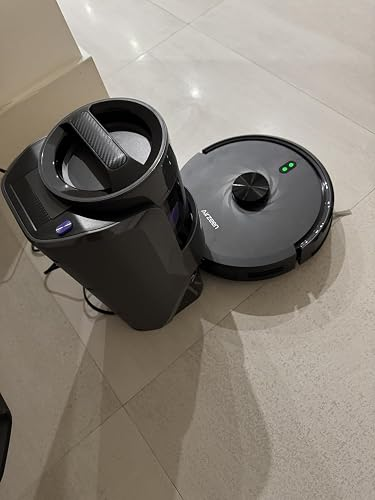
Airzeen J10 Specifications & Key Features Explained
Airzeen J10 Technical Specifications
| Specification | Airzeen J10 |
|---|---|
| Maximum suction | 4,000Pa |
| Battery | 2,600mAh |
| Advertised runtime | Up to 120 minutes |
| Dustbin | Approximately 300ml |
| Profile | Approximately 3.07 inches / 7.8cm |
| Wi-Fi | 2.4GHz |
| Cleaning | Sweep + Vacuum + Mop |
| Navigation | Gyroscope-based |
| Suction levels | 3 |
| Water-flow levels | 3 |
| Carpet boost | Yes |
| Charging | Automatic |
| Self-emptying | No |
| Mop washing dock | No |
| Voice assistant | Alexa |
Airzeen’s official listing confirms 4,000Pa suction, 2,600mAh battery capacity, up to 120 minutes of cleaning, carpet boost, app/remote/voice control, and 2.4GHz connectivity. The J10’s included equipment also includes a charging dock, dustbin/water-tank combination, mop holder, remote, side brushes, mop cloth, main brush, filter, cleaning brush, adapter, and magnetic strip.
What Does 4,000Pa Suction Mean in Real-World Cleaning?
Pa, or pascals, measures pressure generated by the vacuum system. A higher number can indicate stronger suction, but it does not automatically mean a robot will clean better. Brush design, airflow, floor contact, filtration, navigation, and how frequently the robot passes over an area all matter.
The J10’s 4,000Pa maximum rating is competitive for a budget robotic vacuum. It has three suction levels, allowing users to balance cleaning strength and noise or battery consumption. The manufacturer specifically promotes the higher suction setting for debris, dust, and hair across hard floors and carpets.
This is also why technical metrics such as CFM airflow and Water Lift (inches) should not be invented simply to make a specification sheet look more complete. Airzeen provides the Pa suction figure, but that does not establish a verified CFM or Water Lift measurement.
Bottom Line: Treat 4,000Pa as a useful suction specification, but judge the robot by actual debris pickup, brush design, filtration, and repeated cleaning coverage—not Pa alone.
3-in-1 Vacuum, Sweep & Mop System
The J10 combines sweeping, vacuuming, and mopping in one machine. Its side brushes help move debris toward the central cleaning path while the vacuum system collects it into the dust container.
For mopping, the robot uses a water tank and cloth attachment. The available documentation identifies adjustable water flow, with three water-flow levels, allowing users to use less moisture for more delicate routine cleaning or more water for suitable hard floors.
This makes the J10 particularly useful for kitchens, tile, laminate, and other sealed hard surfaces where frequent light maintenance is more valuable than aggressive stain removal.
Low-Profile Design & Under-Furniture Cleaning
At approximately 7.8cm / 3.07 inches high, the J10 can reach underneath furniture that is high enough to provide adequate clearance. Independent specification data also lists a maximum threshold capability around 15–17mm, depending on the source and measurement method.
That low profile can be more useful than it sounds. A robot that can reach under beds and cabinets can maintain areas that are otherwise easy to ignore during manual vacuuming.
However, clearance is only useful if the robot can navigate back out. Low furniture with narrow openings can still become a problem, especially because the J10 does not have the advanced mapping and object-recognition capabilities found on premium models.
Bottom Line: The J10’s physical design is one of its more practical strengths, especially for homes with suitable under-furniture clearance.
Airzeen J10 Cleaning Performance Tested by Floor Type
Hard Floor Cleaning Performance
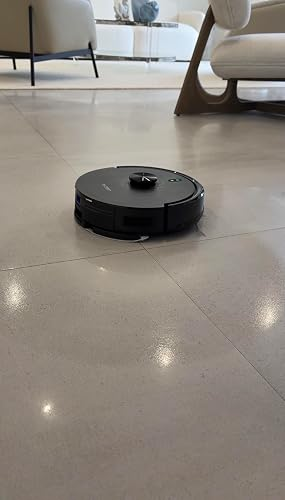
Hard floors are where the J10’s overall design makes the most sense. Dust, crumbs, hair, and everyday debris are the primary targets for its automated cleaning cycle.
On hardwood, laminate, vinyl, and tile, the combination of side-brush sweeping and vacuum pickup provides a useful daily-maintenance routine. The robot does not need to replace a powerful manual vacuum for occasional deep cleaning; instead, its value comes from reducing how often that manual cleaning is necessary.
Fine debris can also accumulate along walls and furniture edges, which is why side-brush performance matters. Airzeen specifically lists edge cleaning among the J10’s capabilities.
Carpet & Rug Performance
The J10 includes automatic carpet power boost. According to Airzeen, the robot detects carpet and increases suction to improve cleaning performance. The manufacturer specifically positions the system for low-pile carpets and homes with pets.
Low-pile rugs are therefore a more appropriate target than very thick shag or high-pile carpeting. Thick rugs can create additional resistance and may be harder for a basic robotic vacuum to cross consistently.
The important point is that carpet boost is not equivalent to intelligent floor mapping. It improves suction behavior, while navigation remains relatively basic.
Pet Hair & Everyday Debris Pickup
Pet owners are one of the more logical audiences for the J10 because its 4,000Pa suction and carpet boost can help with routine hair pickup.
But pet owners should also expect maintenance. Hair can wrap around the main brush, while the relatively small dustbin means homes with heavy shedding may require more frequent emptying.
Third-party testing and user reports include positive experiences with pet hair and everyday debris, although results naturally vary according to flooring, hair quantity, and cleaning frequency.
Edge & Corner Cleaning
The side brushes are designed to move debris from edges toward the cleaning path. This helps with dust along walls and in corners, although no round robot can physically reach every 90-degree corner as effectively as a manual crevice tool.
For best results, schedule regular runs rather than waiting until a large amount of debris has accumulated.
Bottom Line: The J10 is better suited to frequent maintenance cleaning than occasional heavy-duty recovery cleaning.
Airzeen J10 Navigation, Sensors & Obstacle Avoidance
How the J10 Navigates Your Home
The J10 uses gyroscope-based navigation and cleaning patterns such as zig-zag, spot, random, and edge cleaning. Its system is designed to move methodically rather than relying entirely on uncontrolled random movement.
That distinction matters. However, methodical movement should not be confused with advanced map-based navigation.
A premium robot using LiDAR navigation can scan its surroundings, build a persistent floor map, identify rooms, and plan routes around the home. The J10’s navigation system is considerably simpler.
Anti-Collision & Anti-Drop Sensors
Airzeen describes the J10 as having infrared anti-fall and collision sensing. These sensors are intended to help the robot detect obstacles, walls, and stairs.
This provides basic obstacle protection, but it is not the same thing as AI obstacle avoidance. AI-powered systems may identify individual objects such as shoes, cables, toys, or pet waste using cameras or more advanced sensors.
With the J10, sensible floor preparation remains important.
Does the Airzeen J10 Have LiDAR or SLAM Mapping?
No advanced LiDAR or SLAM mapping should be attributed to this model.
Independent specifications identify gyroscope navigation, with no floor mapping and no map editing.
This also means buyers should not expect sophisticated multi-floor mapping, room naming, or the precise zone-management experience found on more expensive robotic vacuum systems.
This distinction is important for SEO as well as accuracy: terms such as LiDAR navigation, SLAM mapping, AI obstacle avoidance, and multi-floor mapping are relevant semantic concepts in the robot-vacuum category, but they should be used to explain what the J10 lacks or how it compares—not falsely presented as J10 features.
Navigation Limitations in Complex Homes
The simpler navigation approach is most noticeable in homes containing many chair legs, cables, narrow passages, thick rugs, and irregular furniture arrangements.
For a relatively open apartment, the limitation may not matter much. In a large, complicated home, however, a robot without persistent mapping can spend more time navigating and may require more user intervention.
Bottom Line: The J10’s navigation is functional for its price category, but buyers wanting LiDAR, SLAM, AI obstacle avoidance, or multi-floor mapping should consider a more advanced robot.
Airzeen J10 Mopping Performance — Can It Replace a Mop?
How the Mopping System Works
The J10 uses a combined dustbin/water-tank setup and a detachable mopping cloth holder. Airzeen positions the device as a simultaneous sweep, vacuum, and mop solution.
Its water-flow adjustment is useful because not every floor needs the same amount of moisture. The available manual information identifies three water-flow levels.
This is best understood as maintenance mopping rather than a replacement for a traditional mop and bucket.
Hard-Floor Mopping Results
Light dust film, footprints, and fresh surface residue are appropriate targets. Regular mopping can keep sealed hard floors looking cleaner between deeper manual sessions.
Dried, sticky stains are a different challenge. A fixed mop pad does not have the mechanical scrubbing action of rotating or vibrating premium mop systems.
Therefore, expectations matter. The J10 can automate routine floor wiping, but it is not designed to aggressively scrub heavily soiled surfaces.
Carpet Safety & Mop-Pad Management
This is one area where users must pay attention.
Airzeen specifically instructs users to remove the mop holder when cleaning carpets or establish a no-go area to prevent the carpet from getting wet.
Because the J10 lacks a premium automatic mop-lift system, users should not assume it will intelligently protect every carpeted area while mopping.
Mopping Limitations Compared With Premium Robot Mops
Premium systems may offer rotating mop pads, vibrating plates, automatic mop lifting, hot-water washing, heated drying, and automatic water management.
The J10 does not provide that level of dock automation. It is a simpler system that trades advanced automation for a lower-complexity design.
Bottom Line: The J10’s mop is useful for routine hard-floor maintenance, but buyers wanting hands-free deep mopping should consider a premium robot with automated mop washing and lifting.
Airzeen J10 Battery Life, Charging & Cleaning Coverage
2,600mAh Battery & Up to 120-Minute Runtime
Airzeen specifies a 2,600mAh battery and up to 120 minutes of cleaning time under its stated conditions. The UK listing specifies that the advertised runtime applies with the water tank full.
Actual battery runtime can be lower depending on suction level, floor type, carpet boost, navigation, and operating conditions.
Independent user reports also show that real-world runtime can differ substantially from the advertised maximum.
Automatic Recharge
The J10 can automatically return to its charging station after cleaning or when its battery becomes low. Airzeen specifies automatic return when the battery falls below 15% or after cleaning.
The charging dock should be positioned in an open, accessible location. Blocking its approach path can create unnecessary docking failures.
Is 120 Minutes Enough for a House?
For an apartment or modest home, the advertised 120-minute battery runtime can be sufficient for routine cleaning.
For larger homes, the absence of sophisticated mapping becomes more relevant because efficient coverage matters as much as battery capacity.
A robot that spends extra time navigating cannot make the same use of its battery as a robot with precise room mapping.
Battery Longevity & Replacement Considerations
Rechargeable batteries naturally lose capacity over time. Heavy daily use, frequent high-power cleaning, and long-term charging cycles can affect effective runtime.
Users should therefore judge the J10’s battery as a consumable component rather than expecting the original maximum runtime indefinitely.
Bottom Line: Battery capacity is competitive for the class, but the 120-minute figure is a maximum advertised runtime, not a guaranteed everyday result.
Airzeen J10 App, Remote Control & Smart Home Features
HonySmart App Setup
The J10 works with the HonySmart app. Airzeen’s official instructions explain that users can schedule cleaning, change settings, and configure the robot through the application.
The biggest connectivity limitation is straightforward: the J10 supports 2.4GHz Wi-Fi, not 5GHz.
That is not necessarily a performance problem, but users with modern routers should ensure a compatible 2.4GHz network is available during setup.
Scheduling & Cleaning Modes
The app supports scheduled cleaning and multiple cleaning patterns. Available modes include zig-zag, spot, random, and edge cleaning.
Scheduling is one of the J10’s strongest convenience features because the whole point of an automated floor cleaner is to remove repetitive manual work.
Alexa & Voice Control
Airzeen confirms Alexa integration after connecting the robot through HonySmart and enabling the relevant voice-control function.
This gives the J10 useful smart home integration, although its overall smart-home experience remains simpler than premium ecosystems with advanced room maps and detailed cleaning zones.
Physical Remote Control
The included remote is a surprisingly practical feature.
A user does not have to rely entirely on the smartphone app to start or direct the robot. This can be useful for guests, older users, or anyone who simply wants quick manual control.
Bottom Line: The J10 provides more control options than its price category might suggest, but its connectivity and smart-home system remain basic.
Airzeen J10 Maintenance Guide & Long-Term Ownership
How Often Should You Empty the Dustbin?
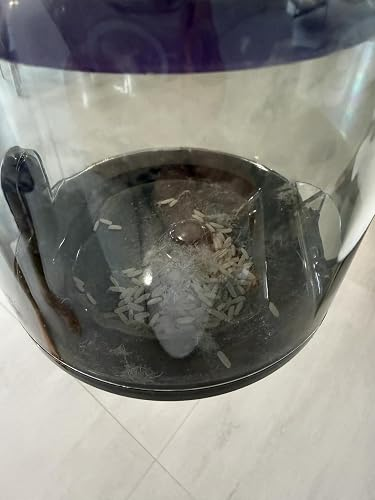
The J10 does not have a self-emptying base, so the dustbin must be manually emptied.
The commonly listed dustbin capacity is approximately 300ml, although some retail/user listings report different capacities, so buyers should verify the capacity of their regional version before purchasing replacement parts.
Pet owners and households with children may need to empty it more frequently.
Cleaning the Main Brush & Side Brushes
Hair is one of the first maintenance issues to monitor.
Inspect the main brush regularly and remove wrapped hair before it becomes tightly wound around the roller. Side brushes should also be checked for threads and hair.
Regular brush maintenance helps preserve cleaning performance and prevents unnecessary motor load.
Filter Cleaning & Replacement
The J10 uses a high-efficiency filter, and independent specifications list a HEPA filter.
However, buyers should not automatically translate the presence of a HEPA filter into a specific HEPA efficiency percentage unless Airzeen provides a verified test standard and percentage.
Similarly, claims about sealed system filtration should not be made without manufacturer testing. Filter type and whole-machine filtration are not identical concepts.
Mop Pad, Water Tank & Dock Maintenance
Wash the mop cloth after use and allow it to dry before storage. Leaving a damp cloth attached for long periods can create unpleasant odors.
The water system should also be emptied when appropriate, while charging contacts should remain clean and dry.
Bottom Line: The J10 saves labor through automation, but it is not maintenance-free. Expect regular dustbin, brush, filter, mop, and charging-contact care.
Airzeen J10 Troubleshooting — Common Problems & Fixes
J10 Won’t Connect to Wi-Fi
First confirm that the router provides a 2.4GHz Wi-Fi network. Airzeen explicitly states that the J10 does not support 5GHz Wi-Fi.
Then move the robot closer to the router, restart the connection process, and confirm that the HonySmart app has the required permissions.
J10 Gets Stuck or Stops Moving
Check for:
- Loose charging cables
- Thick rug edges
- Furniture with narrow clearances
- Hair wrapped around the brush
- Full dustbin
- Objects trapped underneath the robot
Because the J10 does not have advanced AI obstacle avoidance, removing floor clutter before scheduled cleaning is particularly worthwhile.
Airzeen J10 Isn’t Picking Up Enough Dirt
Start with the basics:
- Empty the dustbin.
- Clean the filter.
- Inspect the main brush.
- Increase suction.
- Check the battery.
- Confirm carpet boost is operating on rugs.
A clogged filter can reduce effective airflow even when the motor’s maximum suction specification remains unchanged.
J10 Won’t Return to Charging Dock
Check that:
- The dock is plugged in.
- The charging contacts are clean.
- The approach path is clear.
- The dock has not been moved.
- The robot has enough battery to navigate home.
Bottom Line: Most basic performance problems should first be investigated through maintenance, obstruction checks, and connectivity—not by assuming the motor has failed.
Airzeen J10 Model Comparisons — Which Robot Vacuum Is Better?
Airzeen J10 vs Airzeen Q10 Pro
The J10 should be considered the simpler option when the buyer prioritizes basic automated vacuuming, mopping, app control, and value.
The comparison should focus on the actual regional specifications rather than assuming a newer model automatically performs better. Airzeen’s current lineup includes multiple robotic vacuum models, so availability and feature sets can vary by market.
Airzeen J10 vs Airzeen G20 Pro
For this comparison, focus on:
- Cleaning technology
- Navigation
- Dock automation
- Battery
- App functionality
- Mopping
- Consumable costs
The key buying question is whether the additional features of the alternative justify its higher price.
Airzeen J10 vs Budget Competitors
A meaningful comparison should examine more than suction.
| Feature | Airzeen J10 | Premium-Class Robot |
|---|---|---|
| Suction | 4,000Pa | Often higher |
| Navigation | Gyroscope | Often LiDAR/camera |
| Mapping | Limited/no persistent map | Advanced |
| Mopping | Basic pad | Advanced systems available |
| Self-emptying | No | Common on premium models |
| Mop washing | No | Available on premium models |
| Voice control | Alexa | Usually broader |
| Maintenance | Manual | More automated |
Airzeen J10 vs LiDAR Robot Vacuums
This is one of the most important comparisons for prospective buyers.
A LiDAR robot can continuously scan its environment and construct a more sophisticated representation of the home. SLAM-based systems can use sensor data to localize the robot while building a map.
The J10’s gyroscope-based approach is much simpler. Independent data specifically identifies the model as lacking floor mapping and map editing.
Bottom Line: Choose the J10 for straightforward automated cleaning; choose a LiDAR/SLAM robot when navigation intelligence and multi-room mapping are more important than initial cost.
Who Should Buy the Airzeen J10?
Best for Apartment Owners
The J10 is particularly logical for apartments with mostly hard flooring and relatively open layouts.
Its low body, automated cleaning, mopping function, and scheduled operation can handle the repetitive maintenance that apartment owners often need.
Best for Pet Owners
Pet owners can benefit from the combination of 4,000Pa suction, carpet boost, and frequent automated cleaning.
The important tradeoff is maintenance. Hair still needs to be removed from the brush, and a smaller dustbin can require more frequent emptying.
Best for Seniors & Users Wanting Simple Controls
The physical remote is a genuine advantage.
Users can control the robot without depending entirely on a smartphone, while the app and Alexa provide additional options for those who prefer smart controls.
Who Should NOT Buy It?
Skip the J10 if your priority is:
- Self-emptying
- Advanced LiDAR navigation
- SLAM mapping
- Multi-floor map storage
- AI object recognition
- Automatic mop washing
- Aggressive mechanical scrubbing
Bottom Line: The J10 is a better match for buyers seeking simple automation and strong basic cleaning than technology enthusiasts looking for the most sophisticated robot vacuum available.
Buyer’s Intent — Is Airzeen J10 Worth Buying?
Best Airzeen J10 Alternative for Budget Buyers
A competing budget robot can make more sense if it offers similar suction and mopping performance at a lower price.
However, the comparison should include consumables, warranty, app quality, navigation, and replacement parts—not just the purchase price.
Best Upgrade for Advanced Navigation
If precise mapping is important, look for a robot with:
- LiDAR navigation
- SLAM mapping
- Room recognition
- Multi-floor mapping
- Advanced obstacle avoidance
This is where spending more can create a noticeable improvement in daily usability.
Best Alternative for Pet Hair
Pet-focused buyers should prioritize:
- Strong suction
- Carpet boost
- Anti-tangle brush design
- Larger dustbin
- Effective filtration
A higher Pa rating alone does not guarantee better pet-hair performance.
Best Alternative for Hands-Free Cleaning
Buyers wanting the least manual involvement should move toward a dock with:
- Automatic dust collection
- Mop washing
- Mop drying
- Automatic water refill
The J10 deliberately keeps these systems out of the package, which helps simplify the product but increases hands-on maintenance.
Bottom Line: The J10 is worth considering when its combination of cleaning, mopping, controls, and price matches your needs. It becomes less attractive when advanced automation is your primary buying criterion.
Airzeen J10 Pros, Cons & Final Verdict
Biggest Strengths
The strongest part of the J10 package is the combination of 4,000Pa suction, carpet boost, 3-in-1 cleaning, slim design, and multiple control methods.
It also offers useful automation through scheduled cleaning and automatic charging without requiring a premium docking station.
Biggest Weaknesses
The biggest weakness is navigation sophistication. Buyers accustomed to LiDAR robots may find the J10’s lack of persistent mapping limiting.
The absence of self-emptying and automatic mop washing also means the owner remains responsible for several routine maintenance tasks.
Airzeen J10 Value-for-Money Score
| Category | Score |
|---|---|
| Vacuuming | 8/10 |
| Mopping | 6.5/10 |
| Navigation | 5.5/10 |
| Battery | 7/10 |
| App & Controls | 8/10 |
| Maintenance | 6.5/10 |
| Pet Hair | 7.5/10 |
| Value | 8/10 |
| Overall | 7.2/10 |
These are editorial scores based on the feature set and available testing/review evidence, rather than manufacturer ratings. Independent evaluations similarly show the J10 performing better in cleaning and smart features than in navigation.
Final Recommendation
The Airzeen J10 is a sensible choice for someone who wants an affordable robot vacuum system capable of routine vacuuming and mopping without the complexity or cost of a premium docking system.
Its 4,000Pa suction, carpet boost, compact body, remote control, app, Alexa support, and automatic charging create a strong everyday package.
But it should be purchased with realistic expectations. It is not a LiDAR robot, it does not offer sophisticated SLAM mapping, and it does not provide the hands-free dock automation found on more expensive models.
Bottom Line: Buy the Airzeen J10 if you want affordable automated floor maintenance, particularly for hard floors, apartments, pets, and everyday debris. Skip it if advanced mapping, AI obstacle avoidance, multi-floor mapping, self-emptying, or premium mopping automation are must-have features.
Airzeen J10 FAQs — People Also Ask
Is the Airzeen J10 a good robot vacuum?
Yes, for its intended category. It combines 4,000Pa suction, vacuuming, sweeping, mopping, carpet boost, app control, remote control, and automatic charging. Its main weakness is basic navigation compared with premium mapping robots.
Does the Airzeen J10 have LiDAR navigation?
No. Available specifications identify gyroscope navigation rather than LiDAR. Independent testing data also reports that the J10 does not create a persistent floor map.
How strong is the Airzeen J10 suction?
Its advertised maximum suction is 4,000Pa. It also provides adjustable suction levels and automatic carpet boost.
How long does the Airzeen J10 battery last?
Airzeen advertises up to 120 minutes from its 2,600mAh battery, although actual runtime varies with suction, carpet, mopping, and operating conditions.
Can the Airzeen J10 vacuum and mop at the same time?
Yes. It is designed as a 3-in-1 sweep, vacuum, and mop cleaner. Airzeen also provides adjustable water flow for the mopping function.
Does the Airzeen J10 work with Alexa?
Yes. Airzeen’s instructions explain that Alexa can be connected through the HonySmart app after the robot has been successfully connected.
Does the Airzeen J10 support 5GHz Wi-Fi?
No. Airzeen explicitly states that the J10 supports 2.4GHz Wi-Fi rather than 5GHz.
Does the Airzeen J10 empty itself?
No. It does not have a self-emptying dock, so users must manually empty its dustbin. Independent specifications list approximately 300ml capacity.
Is the Airzeen J10 good for pet hair?
It can be a good option for routine pet-hair maintenance because it combines 4,000Pa suction with carpet boost. However, pet owners should expect more frequent brush and dustbin maintenance.
What should I do if my Airzeen J10 keeps getting stuck?
Remove cables and loose objects, check the main brush, inspect thick rug edges, clear narrow furniture gaps, and ensure the charging path is open. Because the J10 lacks advanced AI object recognition, basic floor preparation is particularly important.